Oblak: a fully declarative NixOS NAS
My test for a machine like this is blunt: if the OS vanished tonight, how much would I have to remember to get it all back? For most NASes the honest answer is a lot. They accumulate a decade of small decisions — mount options, share configs, some cron jobs nobody wrote down — and when the box dies, most of that knowledge dies with it. I wanted this machine to live in a git repo instead. That pretty much narrows the OS choice to one, so: NixOS.
The box is called oblak, which is Slovenian for cloud. It came up in January 2026.
The hardware, honestly
A Ugreen DXP4800 Plus: four drive bays, one NVMe slot, 8 GiB of RAM, a 10 GbE port and a 2.5 GbE one. The 10 GbE mostly waits on four spinning disks, but it’s there. The RAM is the number that shapes the rest of this post.
The four 2 TB drives weren’t bought for this. They’re old disks I found — two WD Reds and two Seagate Barracudas from different eras, one of them made in 2011:
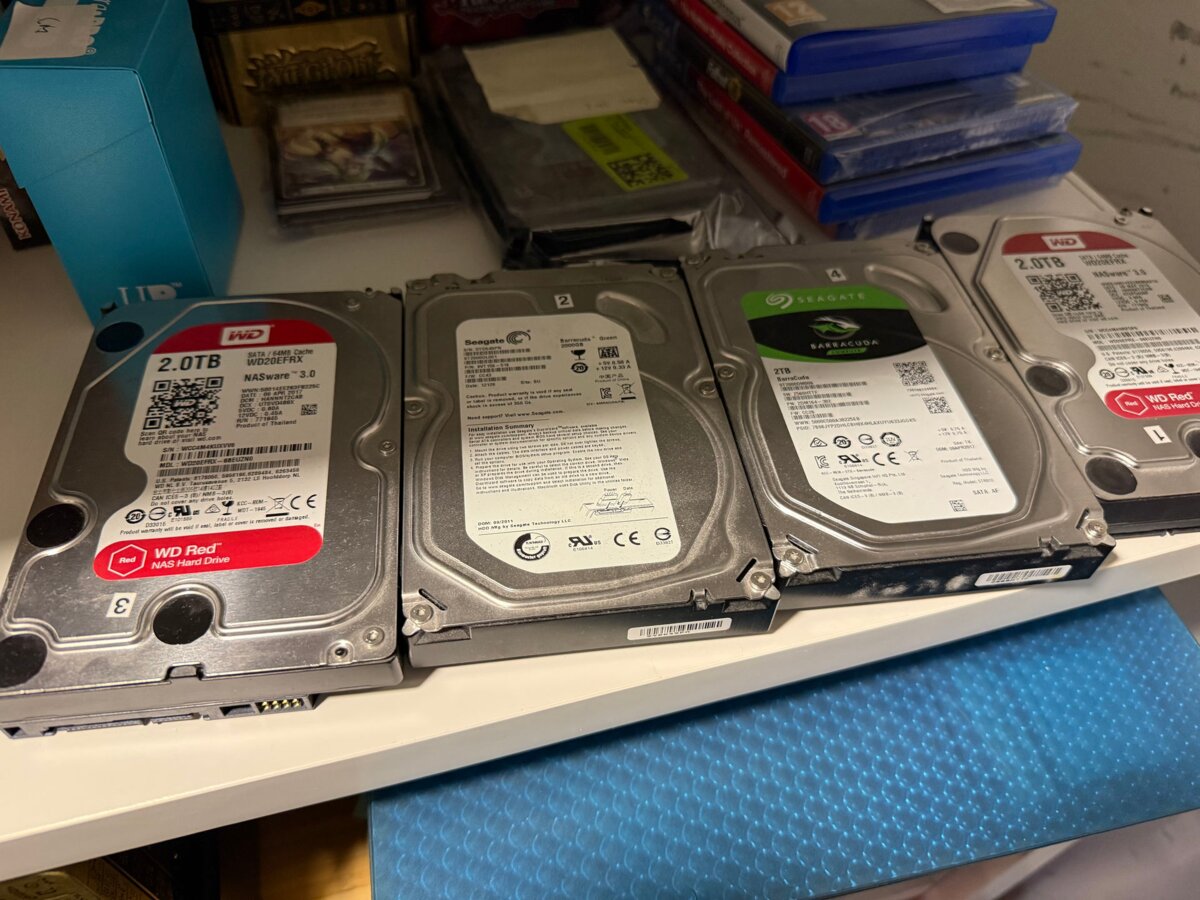
Four mismatched drives, one parity stripe, roughly 6 TiB raw. Good enough. If the 2011 Barracuda gives out first, that’s what raidz1 and a backups dataset are for.
Everything the machine does lives in my NixOS config, under hosts/oblak/. The rest of this post is mostly a tour of that directory.
Disks as data
Disk layout first. With disko, the partition table stops being an evening of sgdisk and mkfs and becomes a value. The NVMe drive, straight from hosts/oblak/disk-config.nix:
disk.main = {
  device = lib.mkDefault "/dev/nvme0n1";
  type = "disk";
  content = {
    type = "gpt";
    partitions = {
      boot = {
        name = "boot";
        size = "1M";
        type = "EF02";
      };
      esp = {
        name = "ESP";
        size = "1G";
        type = "EF00";
        content = {
          type = "filesystem";
          format = "vfat";
          mountpoint = "/boot";
        };
      };
      root = {
        name = "root";
        size = "40G";
        content = {
          type = "filesystem";
          format = "ext4";
          mountpoint = "/";
        };
      };
      zfs_log = {
        name = "zfs-log";
        size = "8G";
      };
      zfs_cache = {
        name = "zfs-cache";
        size = "100%";
      };
    };
  };
};
The system gets 40 GiB of ext4, which is generous — a NixOS generation is a couple of GiB, and the data lives on the pool anyway. The rest of the NVMe isn’t for the OS at all: 8 GiB goes to a ZFS intent log (SLOG), the remainder to a read cache (L2ARC). One NVMe, two jobs, because with 8 GiB of RAM the pool needs whatever caching help it can get.
Each HDD gets the same three lines — GPT, one zfs partition, feed it to storage — so I’ll spare you all four copies.
The pool
Four 2 TB drives, one raidz1 pool:
zpool.storage = {
  type = "zpool";
  mode = "raidz1";
  options = {
    ashift = "12";
    cachefile = "none";
  };
  rootFsOptions = {
    compression = "zstd";
    atime = "off";
    xattr = "sa";
    "com.sun:auto-snapshot" = "false";
  };
  mountOptions = [ "nofail" ];
  mountpoint = "/storage";

  postCreateHook = ''
    zpool add storage log /dev/disk/by-partlabel/disk-main-zfs-log
    zpool add storage cache /dev/disk/by-partlabel/disk-main-zfs-cache
  '';

  datasets = {
    media = {
      type = "zfs_fs";
      mountpoint = "/storage/media";
      mountOptions = [ "nofail" ];
      options = {
        compression = "lz4";
        recordsize = "1M";
      };
    };
    # …
    backups = {
      type = "zfs_fs";
      mountpoint = "/storage/backups";
      mountOptions = [ "nofail" ];
      options = {
        compression = "zstd";
      };
    };
  };
};
atime = off because access timestamps on a media server are pure write amplification. media gets recordsize = "1M" — big immutable files want big records, and the 128 KiB default is tuned for the wrong workload. backups stays on zstd; it’s the one dataset where compression actually earns its CPU.
Then there’s the postCreateHook, which I’m mildly proud of. It grafts the SLOG and L2ARC partitions from the NVMe config above onto the pool at creation time, addressed by partition label. No /dev/nvme0n1p5 roulette after a reboot or a drive swap.
Living with 8 GiB
About that RAM. ZFS on Linux will happily eat all of it for its ARC and starve everything else, so the kernel command line puts a hard cap on it:
boot = {
  supportedFilesystems = [ "zfs" ];
  kernelParams = [
    # 7 / 8 GiB for ARC
    "zfs.zfs_arc_max=${toString (7 * 1024 * 1024 * 1024)}"
  ];
};
Seven of the eight GiB for cache, one for everything else. The comment does the remembering.
Installation: hijacking UGOS with kexec
This was the fun part. The DXP4800 ships with UGOS, Ugreen’s stock Linux. The normal path to another OS is a USB installer and some crossed fingers. I skipped it: flip on SSH in the UGOS settings, kexec into the NixOS installer from the running system, install from there. No USB stick, no opened case.
From there it’s nixos-anywhere pushing the flake at the box while disko lays down the disk config from earlier:
nix run github:nix-community/nixos-anywhere -- --flake .#oblak --target-host user@hostOne wrinkle: secrets. I manage them with sops-nix, keyed by each host’s SSH ed25519 key — and a fresh install is a fresh identity. So the new host key gets converted to an age key with ssh-to-age, added to .sops.yaml, and sops updatekeys re-encrypts the secrets so the new machine can read them. The repo docs walk through this because past me will forget.
Also worth knowing: GRUB needs efiInstallAsRemovable = true, because this firmware is picky about how EFI entries get registered. One line of config instead of a one-line answer buried in a forum thread from 2019.
The watchdog, or why the box kept dying
Then the box started turning itself off.
NixOS was installed and running fine — and every so often it would just power off. No panic, no brownout, nothing in the logs. Usually a couple of minutes after boot. Once mid-nixos-rebuild, which was a special kind of confusing.
The answer, after a lot of digging: Ugreen ships a hardware watchdog, and UGOS pets it. A different OS never does, the timer expires, and the board power-cycles the machine from below — which is exactly why journald had nothing to say. The fix is to disable the watchdog by hand in the BIOS. That meant plugging a monitor into a headless NAS, which I’m fairly sure is the only time this machine will ever see a display.
Being a neighbor
A NAS that keeps changing IP address is a liability, so oblak gets a static address from systemd-networkd — and the address itself comes out of my inventory module:
systemd.network = {
  enable = true;
  networks."10-lan" = {
    matchConfig.Name = "enp1s0";
    address = [ "${config.homelab.hosts.oblak.ip}/24" ];
    gateway = [ "192.168.1.1" ];
  };
};
config.homelab.hosts.oblak.ip is 192.168.1.6, defined once. The same value feeds the monitoring configs and firewall rules that need to know where the box is.
DNS goes to Blocky on razer (the other Linux box here), with 1.1.1.1 as fallback. Avahi advertises oblak.local, and Tailscale means I can reach the box from anywhere. Deploying is the same as for every other host: just upgrade oblak — nixos-rebuild switch --flake .#oblak --target-host under the hood.
Serving the bytes
Everything that mounts this box runs Linux, so NFS it is:
services.nfs.server.exports = ''
  /storage/data    *(rw,sync,no_subtree_check,all_squash,anonuid=1000,anongid=100)
  /storage/media   *(rw,sync,no_subtree_check,all_squash,anonuid=1000,anongid=100)
  /storage/backups *(rw,sync,no_subtree_check,all_squash,anonuid=1000,anongid=100)
'';
The module also pins mountdPort = 4002 and lockdPort = 4001 and opens exactly those, plus 2049, in the firewall. NFS’s habit of negotiating random ports does not survive contact with a firewall, so the ports stop being random.
On the clients, every mount is a systemd automount with an idle timeout. Nothing hard-depends on oblak at boot, so a rebooted NAS doesn’t take everything else down with it.
No Samba, no Jellyfin on this box — media serving lives on razer, and oblak does storage, monitoring, and remote access. A machine with one job. Boring in the good way.
A NAS that files its own incident reports
The pool also maintains itself and files its own reports. Weekly scrubs, TRIM, and ZFS event daemon email through an msmtp relay:
services.zfs = {
  trim.enable = true;

  autoScrub = {
    enable = true;
    interval = "weekly";
  };

  zed = {
    enableMail = true;
    settings = {
      ZED_DEBUG_LOG = "/tmp/zed.debug.log";

      ZED_EMAIL_PROG = lib.getExe pkgs.msmtp;
      ZED_EMAIL_OPTS = "-s '@SUBJECT@' @ADDRESS@";

      ZED_NOTIFY_INTERVAL_SECS = 3600;
      ZED_NOTIFY_VERBOSE = false;
    };
  };
};
The msmtp password comes from sops; smartd sends its own mail through the same relay when a drive starts misbehaving.
Around all that sits the observability stack: node-exporter with the ZFS collector, smartctl-exporter, a couple of custom collectors, and journald shipping to Loki via Grafana Alloy. Prometheus needs no per-host config either — the homelab module generates its scrape configs from the same host list that produced the IP address above. One list, everything derived from it.
The showpiece: LEDs that tell the truth
The part of this setup I most enjoy showing people is hosts/oblak/ugreen-leds.nix. The DXP4800 has per-bay LEDs on the front, and UGOS uses them to show drive health. I wanted that back — but driven by the pool, not by vendor code.
It ended up a small daemon: the i2c-dev kernel module, a udev rule putting the I2C devices in an i2c group, a dedicated system user, and a shell script that polls zpool status storage every three seconds and paints each bay’s LED — green for ONLINE, red for anything else. An LED only changes when the drive state changes, so the loop is idempotent and costs nothing:
update_disk_led() {
  local disk="$1"
  local state="$2"
  local prev_state_file="$STATE_DIR/''${disk}_state"
  local prev_state=""

  if [[ -f "$prev_state_file" ]]; then
    prev_state=$(cat "$prev_state_file")
  fi

  if [[ "$state" != "$prev_state" ]]; then
    if [[ "$state" == "ONLINE" ]]; then
      ${cli} "$disk" -color 0 255 0 -on
    else
      ${cli} "$disk" -color 255 0 0 -on
    fi
    echo "$state" > "$prev_state_file"
  fi
}

# Main loop
while true; do
  for disk in "''${!DISK_MAP[@]}"; do
    wwn="''${DISK_MAP[$disk]}"
    state=$(get_disk_state "$wwn" || echo "UNKNOWN")
    [[ -z "$state" ]] && state="UNKNOWN"
    update_disk_led "$disk" "$state"
  done

  sleep 3
done
Yes, the ''${ sequences are intentional. This is a shell script inside a Nix indented string, and '' is how you escape a ${ that Nix must not interpolate — the shell literally receives ${disk}. The ${cli} without the doubling is Nix, splicing in ugreen-leds-cli, a little tool for talking to the LED controller that somebody kindly packaged in nixpkgs. Power and network LEDs come up solid white, and the drive map is built from the WWNs the pool reports, so bays renumber themselves when drives move.
None of this is really about the LEDs. The front panel is derived state now: a bay goes red because the machine noticed, not because I happened to log in that week.
What oblak is
So: a storage box. ZFS, NFS, monitoring, remote access. Nothing clever, and that’s the point — everything described here is a few hundred lines of Nix in a public repo. Wipe the disks, delete the OS, reinstall from zero, and it converges back to itself. The truth lives in git, not on the platters.
Exactly one manual step survives a reinstall: the watchdog toggle in the BIOS. Nix can’t reach into the firmware. I’ve made my peace with the monitor.